
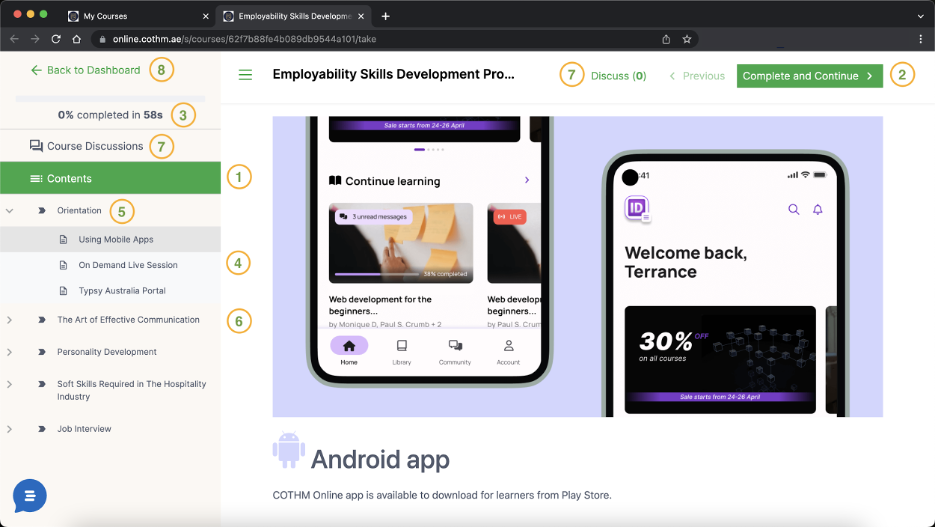
1. Contents: The section contains learning content, quizzes, assignments, mid-term exams and final examination.
2. Move to Next or Previous Chapter: Form this button you go next or previous chapter
3. Progress: Here you can track your overall progress of your course’s completion.
4. On Demand Live Sessions: During your studies, if you find some topics difficult to understand, you can get in touch with our Admin Staff (admin@cothm.ae) to request on demand live session on a specific topic. There will be an additional subsidized cost for COBS learners, which depends on the topic and duration of the on-demand live session.
5. Orientation:
5.1. Typsy Australia Portal: Six months' premium membership of Typsy Australia Portal is included in your package free of cost. You can request an access code for our Admin Staff (admin@cothm.ae). Should you require extending Typsy Australia Portal subscription beyond six months, this can done by paying additional subsidized cost for COBS learners.
5.2. Using Mobile Apps: Mobile apps are readily available for both Android and iOS platforms, here you find all necessary details to access your access content via mobile apps.
6. Learning Module: Your course is divided into modules, under each module its respective learning content, quizzes, assignments, and mid-term exams are organized.
7. Course Discussion: This is a place where you can initiate a discussion and respond to a discussion related to course topis.
Important Notice: Please ensure to strictly adhere discussion compliance policy in order to avoid any disciplinary action.
8. Back to Dashboard: You can click here to go back to your dashboard at any time. Your progress is atomically saved in Real Time as you progress so you can conveniently pause and resume your learning at your convenience.