
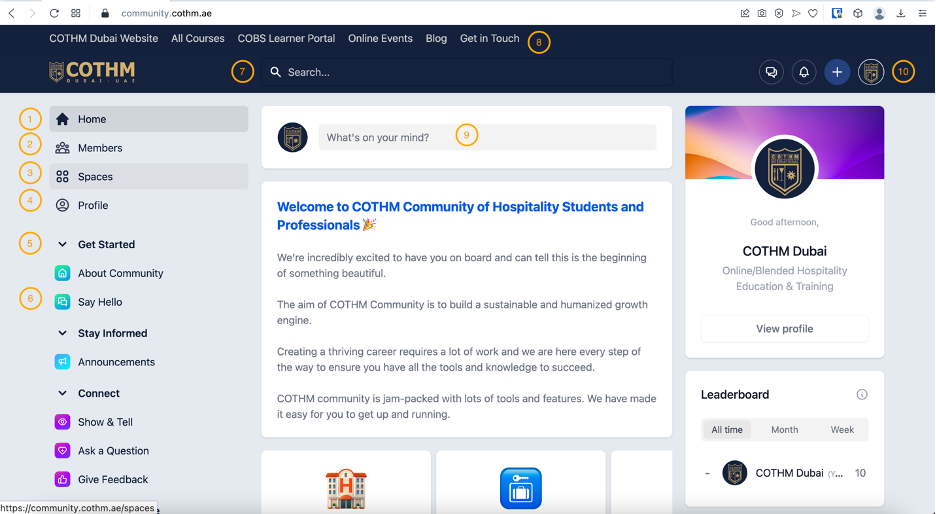
1. Home: This your home at COTHM community, from here you can easily navigate around different sections of your online community.
2. Members: This is a place to explore communality members for creating long lasting connections.
3. Spaces: You can click here to explore community spaces. You can follow your areas of specialization. If you want to suggest a new space, you may get in touch with COTHM Community Admin at admin@cothm.ae.
4. Profile: This is your personal profile that host your professional information and your activities on community. Your profile completeness is linked with an engagement on community. Depending on the course you are taking with COTHM, you might be assessed and marked based on your profile completion.
5. Collection: Is a group of spaces collected into one place.
6. Say Hello: Get started by introducing yourself in the COTHM Community! 👋 Introduce yourself, spark connections and conversation, and welcome other Tribe Campfire Community members as we continue to grow.
7. Search: Strat with any key word in your mind.
8. External Links: Navigate from here to external COTHM links and resources, make sure to get yourself familiar with all platforms to enrich your learning experience with COTHM. COTHM Dubai has developed an online learning and development eco-systems which helps you learn the best during your studies, provide you career opportunities at end of your studies as well as provide all the tools and resources to grow and excel through your career.
9. Publish: This is the area through which you can engage and contribute on community.
a. Article: From here, you can post a full-length knowledge or research article. You might be submitting an article as part of your curriculum assignment depending on the type of course you are taking with COTHM.
b. Quick Post: This is more like posting a quick learning byte, reference to an external article, YouTube training vide, etc.
c. Question: If there could be something worth asking, questions can be asked, and community can answer.
d. Discussion: Open a new discussion or actively participate in ongoing discussion, this can greatly improve your career prospects.
10. My Account: Quickly access you account profile, notification or simply click on “+” sign to start sharing your knowledge ideas, thoughts, and research work.
Important Notice: Please ensure to strictly adhere discussion compliance policy to avoid any disciplinary action